Letter to Tom with Inspiration Software.
Think about Tom's predicaments: both with Becky and the Injun Joe/oath-to-keep-mumsituation. Write a letter to Tom that: 1. Shows you know the detailsof his main problems. 2. Gives him advice on what to do next. 3. Explainswhy your advice is good, and answers a possible objection. -- Make it atabout 300 words long. Use letter form. Spelling, punctuation, and neatnesscount! Proofread it when you are done. Extra credit for good use of slang/dialect.
Part One: Brainstorming Ideas.- Double-click on Inspiration to start it.
- In the center oval, type "Tom's problems."

- Click the Rapid Fire button.

- Type "The problem with Becky is...(blah, blah, blah)" andhit Enter.
- Type "The problem with Injun Joe is...(blah, blah, blah)"and hit Enter.
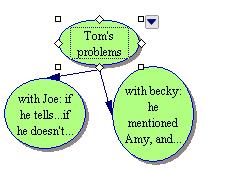
- Click somewhere else, off to the side of the diagramyou just made.
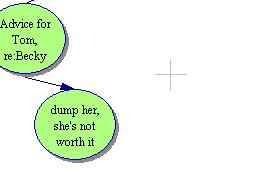
- Over on the Tools Bar, click the oval (or oneof the rectangles).

- Type "Advice for Becky Problem."
- Click the Rapid Fire button.
- Now, brainstorm possible advice for Tom. What should he DOabout his problem with Becky? After you type each one, hit Enter.Thesoftware will make a new balloon for each idea.
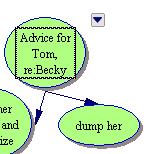
- Once you have a bunch of ideas for the Becky problem, clicksomewhere else, off to the side of the diagram you just made.
- Over on the Tools Bar, click the oval (or one of the rectangles).
- When it appears on the screen, click on it, and type "Advicefor Injun Joe Problem"
- Click the Rapid Fire button again.
- Now brainstorm advice for Tom's second big problem. Whatshould he DO about his oath and the murder? After you type each one,hit Enter. The software will make a new balloon for each idea.
- Once you have a bunch of ideas, look at all the things youcame up with, and decide which piece of advice you will use for each problem.
- Click once on the idea you like and then click the bigstar in the Tools Bar. Star an idea for each problem.

Objections/Rebuttals- Click on one of your starred ideas.
- Click the Rapid Fire button again.
- Now brainstorm possible objections to that idea. After eachone, hit Enter.
- Change the ovals for the objections to the talk balloonshape.

- Now think about your rebuttals for each objection. Clickonce on an objection, click the Rapid Fire button, and type your rebuttalsfor each objection, and hit Enter after each one.
- Change those rebuttal ovals to little clouds.

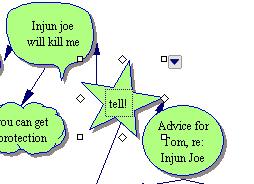
- Save to your spot on the server. Call the file "Tom's problems."
Part Two: Organizing and writing.- Look at your diagram, and delete the ideas you didn't star.(Click once on each, and hit the delete key.)
- Now, click the Outline button.

- You will see your letter organized for you.
- If the "Tom's Problems" part ends up at the bottom, clickon the small box to the left of that line of the outline, and drag it tothe top.

- Go to theFile menu, and choose "Transfer to Word Processor."
- This will open up Word.
- Begin writing your letter, above the outline. Use the outlineto remind yourself how to organize your letter, and what to say. "DearTom, I see you got a whopper of a problem with that gal, Becky. You wentand talked about Amy..."
- Be sure to save your Word document to your space on the server.BUT, DON'T SAVE THE INSPIRATION FILE! I want to see all your ideas, notjust the ones you used.
- Remember: You get bonus credit for good use of slang. Spelling,punctuation, and mechanics all count. Use paragraphs.
Pivacy Policy